


Bitcoin is a cool way to store, spend and earn money. Learn how to get started with this new currency system.
Before you can get started with bitcoins it would be a good idea to learn a few basic concepts:
- A bitcoin client is a program or web service that allows you to store, spend and receive bitcoins.
- A bitcoin client gives you a wallet in which your bitcoins are organized.
- A bitcoin address is used to send and receive bitcoins. It is a number in base 58 format. For example 1BitcoinEaterAddressDontSendf59kuE
- You can have an unlimited number of addresses in your bitcoin wallet and it is recommended that you use a new address for every transaction.
To get started with bitcoins I recommend downloading the free electrum bitcoin client program. It provides an easy to use wallet for you to get started with.
To get bitcoins you can buy them from an exchange. You can also earn bitcoins in exchange for your goods or services by advertising them on bitcoin talk marketplace.
How to buy bitcoins
- Signup at LocalBitcoins. Add your phone number and also make use of two step verification for enhanced security. Prove your identity by uploading scanned CNIC or passport. You can still buy and sell without proving your identity but some vendors may require it for large transactions. You are now registered and also have a bitcoin wallet.
- Go to the main page and select Quick Buy. Enter the amount which you want to invest in buying bitcoins. Choose the transaction method.

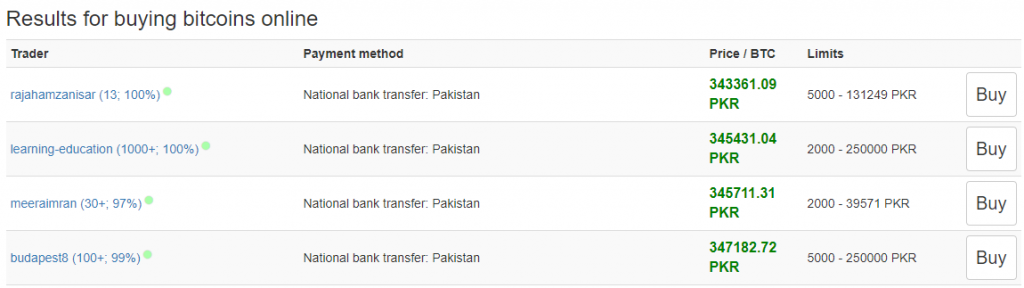
- Upon searching you will see a list of traders offering to sell bitcoins. Choose the one with the good reputation and high response time. The first trader ‘rajahamzanisar (13; 100%)’ has done 13 trades and has 100% positive reputation. Also, beware of price per Bitcoin asked by the seller.
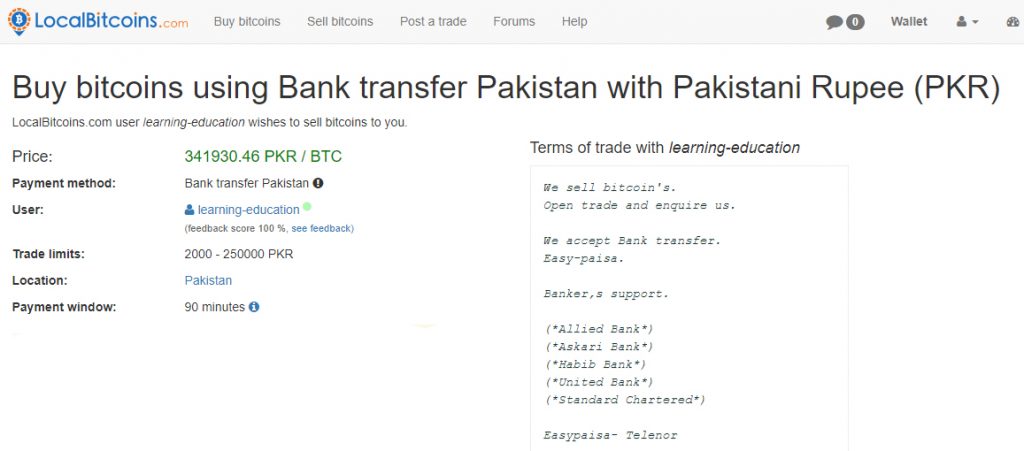
- After you select a trader you will see information about terms of trade. If you agree to terms then proceed by clicking on ‘Send the trade request’.
- Additional information about where to send the money will be generated. You will have a limited time, usually 90 minutes, to transfer money. Your bitcoins will be available in your wallet once the seller has verified the payment. In case the bitcoins aren’t transferred to your account, you can mark the transaction as a dispute. Disputes are usually resolved in 24 to 48 hours.
Sign up now to purchase Bitcoins instantly
How to sell bitcoins
- Selling bitcoins isn’t much different than buying. Just go to the main page and select ‘Quick Sell’ and enter the amount in rupees for which you want to sell bitcoins. Choose the payment method (eg. Easypaisa).

- Select a trader of your choice and press sell. You will see terms of trade and other information about the trader. Take into account the reputation and trade history of the trader before sending the request.
- Send the trade request. The buyer will contact you and ask for payment details (eg. your account number, in case you selected bank transaction method).
- Once you have received payment click on ‘Release bitcoins‘ to deliver them to the buyer. In case you accidentally released bitcoins before payment there is no going back. Transaction once made cannot be reversed.
Sign Up now and start selling Bitcoins
How to use bitcoins
Once you have acquired bitcoins, you can access them through your wallet and use them wherever they are acceptable.
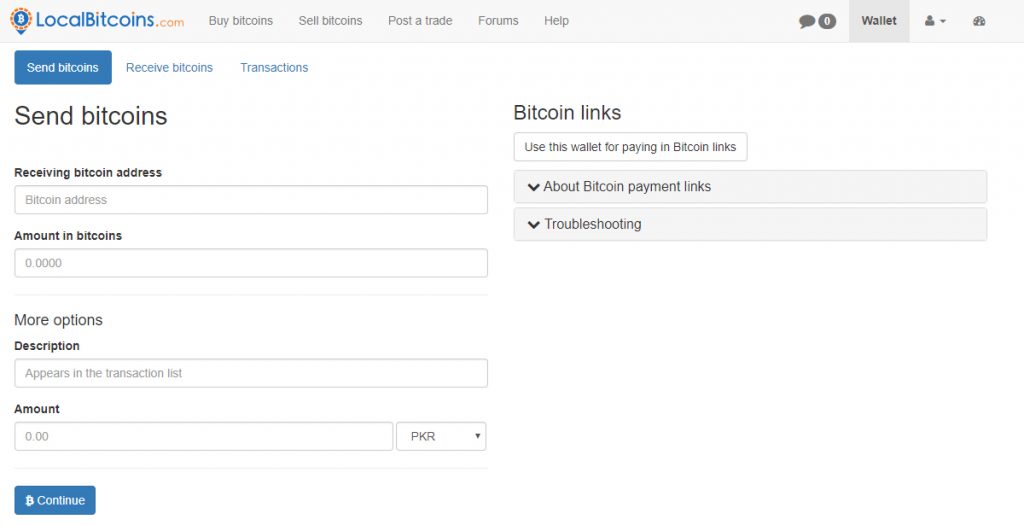
- To send bitcoins to someone just click on ‘Send bitcoins‘. Enter the address of the other person’s wallet where you want to send. Enter the amount and proceed. Your Bitcoins will be sent to the address.
- To receive Bitcoin just generate the address of your wallet by clicking on ‘Receive bitcoins’. Send it to the person who wants to send you bitcoins. That’s all folks.
LocalBitcoins is more like an online marketplace where buyers and sellers are connected with each other. The transaction fees are low and are applied only if other person’s wallet is outside LocalBitcoins. The best thing is that this service is available in Pakistan. If you have any questions feel free to leave your comment below.


0 comments: